
Skip to content
View in the app

A better way to browse. Learn more.

tả pí lù

A full-screen app on your home screen with push notifications, badges and more.

To install this app on iOS and iPadOS
  1. Tap the Share icon in Safari
  2. Scroll the menu and tap Add to Home Screen.
  3. Tap Add in the top-right corner.
To install this app on Android
  1. Tap the 3-dot menu (⋮) in the top-right corner of the browser.
  2. Tap Add to Home screen or Install app.
  3. Confirm by tapping Install.
ĐĂNG KÝ THÀNH VIÊN

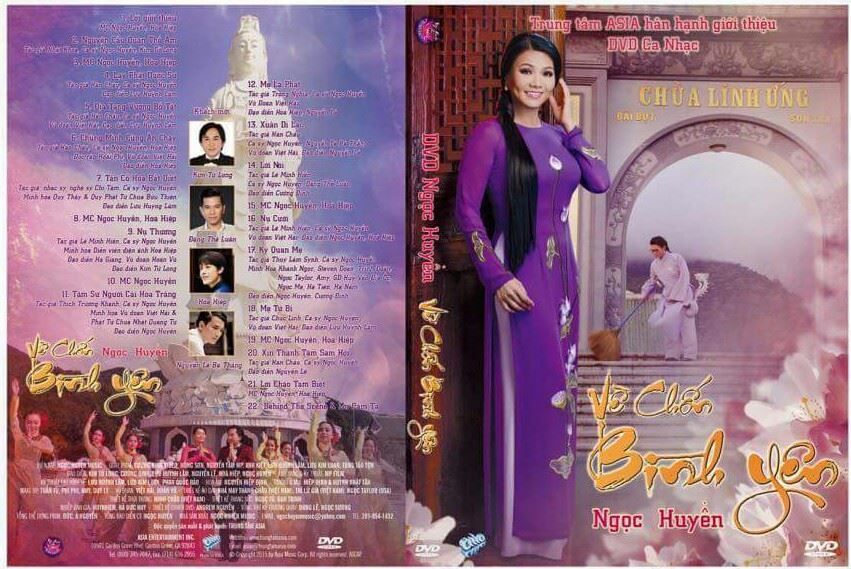
Asia - Ngọc Huyền Về Chốn Bình Yên

1 Screenshot

1. Nguyện Cầu Quan Thế Âm - Ngọc Huyền, Kim Tử Long

2. Lạy Phật Dược Sư - Ngọc Huyền

3. Địa Tạng Vương Bồ Tát - Ngọc Huyền

4. Chúng Mình Cùng An Chay - Ngọc Huyền, Hòa Hiệp

5. Tân Cổ Hoa Bất Diệt - Ngọc Huyền

6. Nụ Thương - Ngọc Huyền

7. Tâm Sự Người Cài Hoa Trắng - Ngọc Huyền

8. Mẹ Là Phật - Ngọc Huyền

9. Xuân Di Lạc - Ngọc Huyền, Nguyễn Lê Bá Thắng

10. Lời Nói - Ngọc Huyền, Đặng Thế Luân

11. Nụ Cười - Ngọc Huyền

12. Kỳ Quan Mẹ - Ngọc Huyền

13. Mẹ Từ Bi - Ngọc Huyền

14. Xin Thành Tâm Sám Hối - Ngọc Huyền

Behind The Scene & Lời Cảm Tạ

Account

Navigation

Search

Search

Configure browser push notifications

Chrome (Android)
  1. Tap the lock icon next to the address bar.
  2. Tap Permissions → Notifications.
  3. Adjust your preference.
Chrome (Desktop)
  1. Click the padlock icon in the address bar.
  2. Select Site settings.
  3. Find Notifications and adjust your preference.