
Skip to content
View in the app

A better way to browse. Learn more.

tả pí lù

A full-screen app on your home screen with push notifications, badges and more.

To install this app on iOS and iPadOS
  1. Tap the Share icon in Safari
  2. Scroll the menu and tap Add to Home Screen.
  3. Tap Add in the top-right corner.
To install this app on Android
  1. Tap the 3-dot menu (⋮) in the top-right corner of the browser.
  2. Tap Add to Home screen or Install app.
  3. Confirm by tapping Install.
ĐĂNG KÝ THÀNH VIÊN

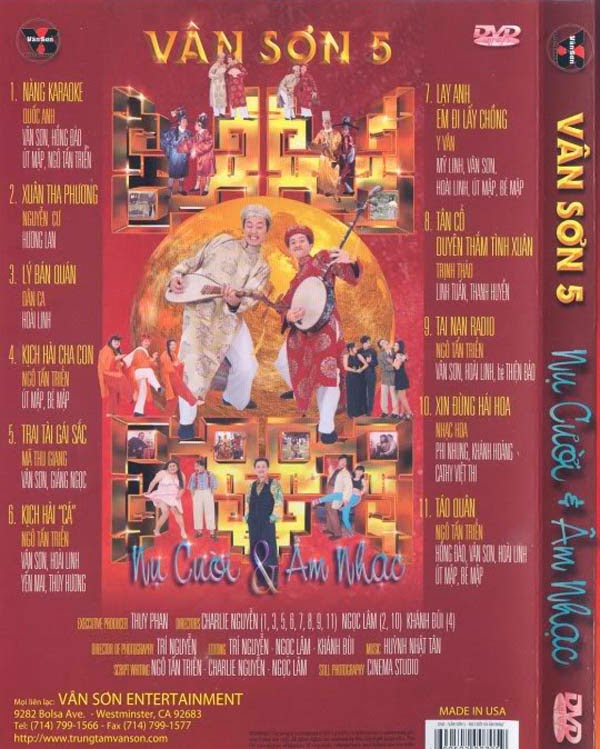
Vân Sơn 5 - Nụ Cười & Âm Nhạc 5

1 Screenshot

  1. Nàng Karaoke - Vân Sơn, Hồng Đào, Út Mập, Ngô Tấn Triển
  2. Xuân Tha Phương - Hương Lan
  3. Lý Bán Quán - Hoài Linh
  4. Hài kịch: Cha Con - Út Mập, Bé Mập
  5. Trai Tài Gái Sắc - Vân Sơn, Giáng Ngọc
  6. Hài kịch: Cá - Vân Sơn, Hoài Linh, Yến Mai, Thuy Huong
  7. Lạy Anh Em Đi Lấy Chồng - Lưu Mỹ Linh, Vân Sơn, Hoài Linh, Út Mập, Bé Mập
  8. Duyên Thắm Tình Xuân - Linh Tuấn, Thanh Huyền
  9. Tai Nạn Radio - Vân Sơn, Hoài Linh, Thiên Bảo
  10. Xin Đừng Hái Hoa - Phi Nhung, Khánh Hoàng, Việt Thi
  11. Táo Quân - Hồng Đào, Vân Sơn, Hoài Linh, Út Mập, Bé Mập

Account

Navigation

Search

Search

Configure browser push notifications

Chrome (Android)
  1. Tap the lock icon next to the address bar.
  2. Tap Permissions → Notifications.
  3. Adjust your preference.
Chrome (Desktop)
  1. Click the padlock icon in the address bar.
  2. Select Site settings.
  3. Find Notifications and adjust your preference.