
Skip to content
View in the app

A better way to browse. Learn more.

tả pí lù

A full-screen app on your home screen with push notifications, badges and more.

To install this app on iOS and iPadOS
  1. Tap the Share icon in Safari
  2. Scroll the menu and tap Add to Home Screen.
  3. Tap Add in the top-right corner.
To install this app on Android
  1. Tap the 3-dot menu (⋮) in the top-right corner of the browser.
  2. Tap Add to Home screen or Install app.
  3. Confirm by tapping Install.
ĐĂNG KÝ THÀNH VIÊN

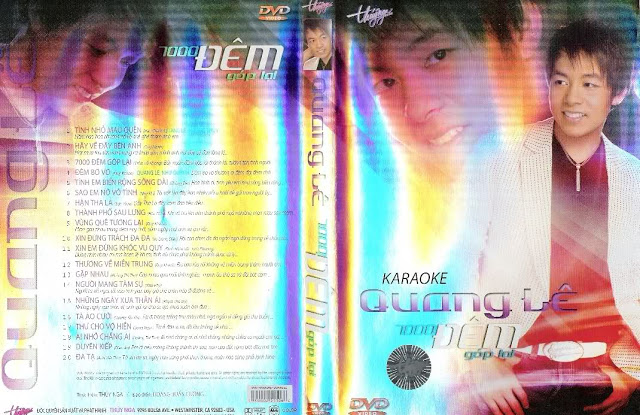
The Best Of Quang Lê - 7000 Đêm Góp Lại

1 Screenshot

  1. Tình Nhỏ Mau Quên - Quang Lê, Hương Thủy
  2. Hãy Về Đây Bên Anh - Quang Lê
  3. 7000 Đêm Góp Lại - Quang Lê
  4. Đêm Bơ Vơ - Quang Lê, Như Quỳnh
  5. Tình Em Biển Rộng Sông Dài - Quang Lê
  6. Sao Em Nở Vô Tình - Quang Lê
  7. Hận Tha La - Quang Lê
  8. Thành Phố Sau Lưng - Quang Lê
  9. Vùng Quê Tương Lai - Quang Lê
  10. Xin Đừng Trách Đa Đa - Quang Lê
  11. Xin Em Đừng Khóc Vu Quy - Quang Lê
  12. Thương Về Miền Trung - Quang Lê
  13. Gặp Nhau - Quang Lê
  14. Người Mang Tâm Sự - Quang Lê
  15. Những Ngày Xưa Thân Ái - Quang Lê
  16. Tà Áo Cưới - Quang Lê
  17. Thư Cho Vợ Hiền - Quang Lê
  18. Ai Nhớ Chăng Ai - Quang Lê
  19. Duyên Kiếp - Quang Lê
  20. Đa Tạ - Quang Lê

Account

Navigation

Search

Search

Configure browser push notifications

Chrome (Android)
  1. Tap the lock icon next to the address bar.
  2. Tap Permissions → Notifications.
  3. Adjust your preference.
Chrome (Desktop)
  1. Click the padlock icon in the address bar.
  2. Select Site settings.
  3. Find Notifications and adjust your preference.