
Skip to content
View in the app

A better way to browse. Learn more.

tả pí lù

A full-screen app on your home screen with push notifications, badges and more.

To install this app on iOS and iPadOS
  1. Tap the Share icon in Safari
  2. Scroll the menu and tap Add to Home Screen.
  3. Tap Add in the top-right corner.
To install this app on Android
  1. Tap the 3-dot menu (⋮) in the top-right corner of the browser.
  2. Tap Add to Home screen or Install app.
  3. Confirm by tapping Install.
ĐĂNG KÝ THÀNH VIÊN

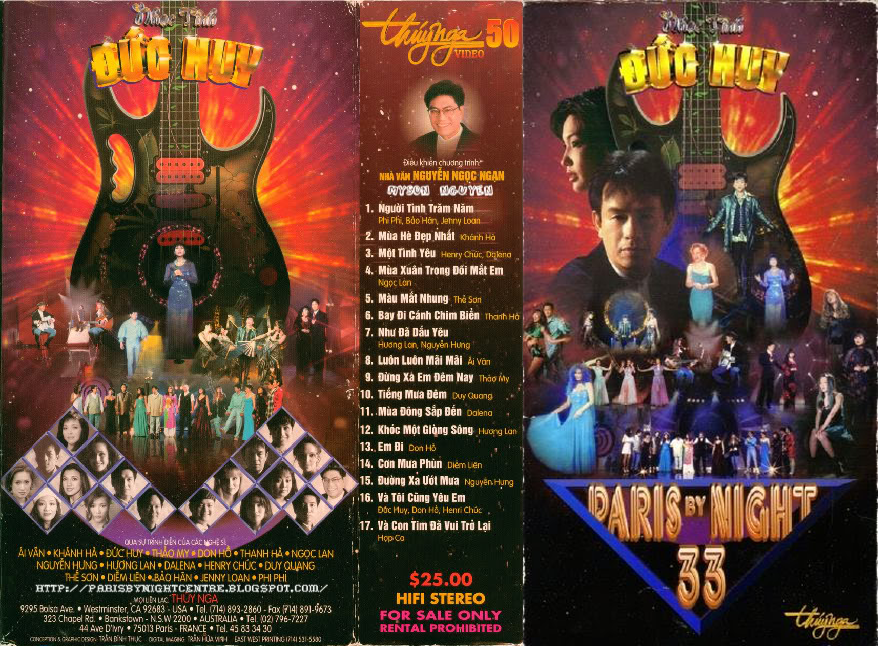
Paris By Night 33 - Nhạc tình Đức Huy

1 Screenshot

1. Nguời Tình Trăm Năm - Bảo Hân, Phi Phi, Jenny Loan
2. Mùa Hè Đẹp Nhất - Khánh Hà
3. Một Tình Yêu - Henry Chúc & Dalena
4. Mùa Xuân Trong Đôi Mắt Em - Ngọc Lan
5. Màu Mắt Nhung - Thế Son
6. Bay Đi Cánh Chim Biển - Thanh Hà
7. Nhu Đa Dấu Yêu - Nguyễn Hung
8. Luôn Luôn Mãi Mãi - Ái Vân
9. Đừng Xa Em Đem Nay - Thảo My
10. Tiếng Mua Đem - Duy Quang
11. Mùa Đông Sắp Đến Trong Thành Phố - Dalena
12. Khóc Một Giòng Sông - Huong Lan
13. Em Đi - Don Hồ
14. Con Mua Phùn - Diễm Liên
15. Đuờng Xa Uớt Mua - Nguyễn Hung
16. Và Tôi Cung Yêu Em - Đức Huy, Don Hồ, Henry Chúc
17. Và Con Tim Đa Vui Trở Lại - Hợp Ca

Account

Navigation

Search

Search

Configure browser push notifications

Chrome (Android)
  1. Tap the lock icon next to the address bar.
  2. Tap Permissions → Notifications.
  3. Adjust your preference.
Chrome (Desktop)
  1. Click the padlock icon in the address bar.
  2. Select Site settings.
  3. Find Notifications and adjust your preference.