
Skip to content
View in the app

A better way to browse. Learn more.

tả pí lù

A full-screen app on your home screen with push notifications, badges and more.

To install this app on iOS and iPadOS
  1. Tap the Share icon in Safari
  2. Scroll the menu and tap Add to Home Screen.
  3. Tap Add in the top-right corner.
To install this app on Android
  1. Tap the 3-dot menu (⋮) in the top-right corner of the browser.
  2. Tap Add to Home screen or Install app.
  3. Confirm by tapping Install.
ĐĂNG KÝ THÀNH VIÊN

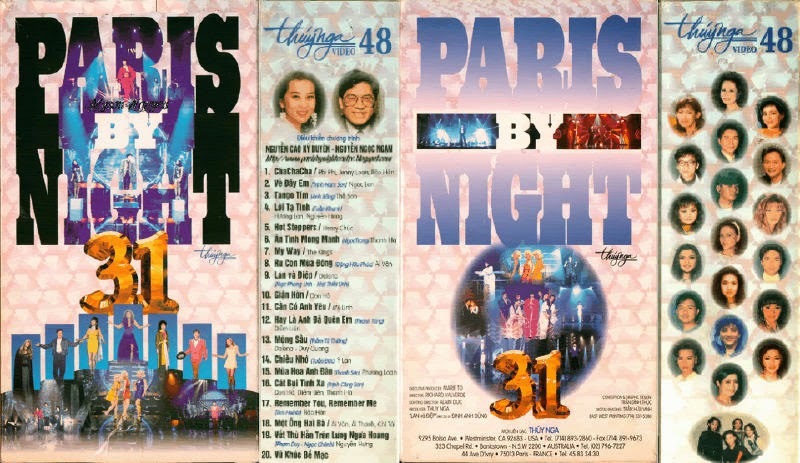
Paris By Night 31 - Không chủ đề

1 Screenshot

01. ChaChaCha - Phi Phi, Jenny Loan & Bảo Hân
02. Về Ðây Em - Ngọc Lan
03. Tango Tím - Thế Sơn
04. Lời Tạ Tình - Hương Lan & Nguyễn Hưng
05. Hot Steppers - Henry Chúc
06. Ân Tình Mong Manh - Thanh Hà
07. My Way - The Kings
08. Ru Con Mùa Ðông - Ái Vân
09. Lan Và Ðiệp - Dalena
10. Giận Hờn - Don Hồ
11. Cần Có Anh Yêu - Mỹ Linh
12. Hay Là Anh Ðã Quên Em - Diễm Liên
13. Mộng Sầu - Dalena & Duy Quang
14. Chiều Nhớ - Ý Lan
15. Mùa Hoa Anh Ðào - Phương Loan
16. Cát Bụi Tình Xa - Don Hồ, Diễm Liên & Thanh Hà
17. Remember You, Remember Me - Bảo Hân
18. Một Ông Hai Bà - Ái Vân, Ái Thanh & Chí Tài
19. Vết Thù Trên Lưng Ngựa Hoang - Nguyễn Hưng
20. Vũ Khúc Bế Mạc

Account

Navigation

Search

Search

Configure browser push notifications

Chrome (Android)
  1. Tap the lock icon next to the address bar.
  2. Tap Permissions → Notifications.
  3. Adjust your preference.
Chrome (Desktop)
  1. Click the padlock icon in the address bar.
  2. Select Site settings.
  3. Find Notifications and adjust your preference.