
Skip to content
View in the app

A better way to browse. Learn more.

tả pí lù

A full-screen app on your home screen with push notifications, badges and more.

To install this app on iOS and iPadOS
  1. Tap the Share icon in Safari
  2. Scroll the menu and tap Add to Home Screen.
  3. Tap Add in the top-right corner.
To install this app on Android
  1. Tap the 3-dot menu (⋮) in the top-right corner of the browser.
  2. Tap Add to Home screen or Install app.
  3. Confirm by tapping Install.
ĐĂNG KÝ THÀNH VIÊN

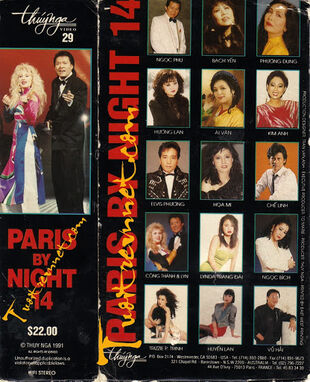
Paris By Night 14 - Không chủ đề

1 Screenshot

1. Qua Cầu Gió Bay (Dân Ca) – Elvis Phương & Ái Vân

2. Sắc Hoa Màu Nhớ (Vì Dân) - Phương Dung

3. Unchaned Melody – Ngọc Bích

4. Everybody – Trizzie Phương Trinh

5. Malaguena Salerosa – Bạch Yến

6. Trăng Về Thôn Dã (Hoài An, Huyền Linh) – Công Thành & Lyn

7. Vọng Cổ "Mẹ Dạy Con" (Viễn Châu) – Hương Lan

8. Tình Hoa Bướm – Lynda Trang Đài

9. Nhìn Nhau Lần Cuối (Nguyễn Vũ) – Elvis Phương & Ái Vân

10. Vũ Nữ Thân Gầy (Lời Việt: Phạm Duy) – Họa Mi

11. Con Đường Xưa Em Đi (Châu Kỳ, Hồ Đình Phương) – Chế Linh & Hương Lan

12. Anh Ở Đâu – Kim Anh

13. Ghét Anh Ghê (Quốc Dũng, Lâm Hoài Thanh) – Công Thành & Lyn

Account

Navigation

Search

Search

Configure browser push notifications

Chrome (Android)
  1. Tap the lock icon next to the address bar.
  2. Tap Permissions → Notifications.
  3. Adjust your preference.
Chrome (Desktop)
  1. Click the padlock icon in the address bar.
  2. Select Site settings.
  3. Find Notifications and adjust your preference.