
Skip to content
View in the app

A better way to browse. Learn more.

tả pí lù

A full-screen app on your home screen with push notifications, badges and more.

To install this app on iOS and iPadOS
  1. Tap the Share icon in Safari
  2. Scroll the menu and tap Add to Home Screen.
  3. Tap Add in the top-right corner.
To install this app on Android
  1. Tap the 3-dot menu (⋮) in the top-right corner of the browser.
  2. Tap Add to Home screen or Install app.
  3. Confirm by tapping Install.
ĐĂNG KÝ THÀNH VIÊN

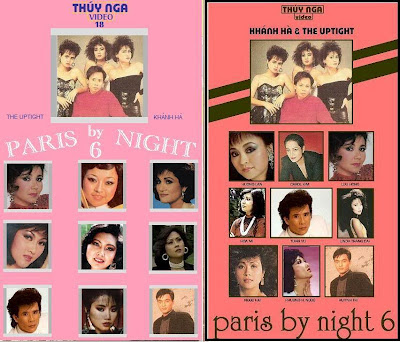
Paris By Night 6 - Không chủ đề

1 Screenshot

01. Tình Tuyệt Diệu (Lời Việt: Lữ Liên) - Lưu Bích

02. Niệm khúc cuối (Ngô Thụy Miên) - Hương Lan

03. Thiên Đàng Ái Ân (Lam Phương) - Lynda Trang Đài

04. Đường Nào Em Đi (Hoàng Nguyên) - Ngọc Hải

05. Phút Say Đắm - Carol Kim

06. Để Quên Con Tim (Đức Huy) - Huỳnh Thi

07. Ảo Ảnh (Y Vân) - Phương Hồng Ngọc

08. Em Đi Rồi (Lam Phương) - Họa Mi

09. Đường Về Khuya (Minh Kỳ) - Tuấn Vũ

10. Bây Giờ Tháng Mấy (Từ Công Phụng) - Lưu Hồng

11. Sau Ngày Cuối Tuần - Lynda Trang Đài

12. Bài Không Tên Cuối Cùng (Vũ Thành An) - Khánh Hà

Account

Navigation

Search

Search

Configure browser push notifications

Chrome (Android)
  1. Tap the lock icon next to the address bar.
  2. Tap Permissions → Notifications.
  3. Adjust your preference.
Chrome (Desktop)
  1. Click the padlock icon in the address bar.
  2. Select Site settings.
  3. Find Notifications and adjust your preference.