
Skip to content
View in the app

A better way to browse. Learn more.

tả pí lù

A full-screen app on your home screen with push notifications, badges and more.

To install this app on iOS and iPadOS
  1. Tap the Share icon in Safari
  2. Scroll the menu and tap Add to Home Screen.
  3. Tap Add in the top-right corner.
To install this app on Android
  1. Tap the 3-dot menu (⋮) in the top-right corner of the browser.
  2. Tap Add to Home screen or Install app.
  3. Confirm by tapping Install.
ĐĂNG KÝ THÀNH VIÊN

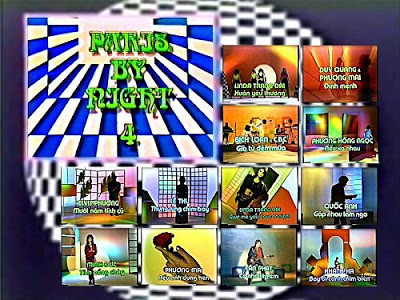
Paris By Night 4 - Không chủ đề

1 Screenshot

  1. Xuân Yêu Thương (Lời Việt: Lê Đức Cường) - Lynda Trang Đài
  2. Định Mệnh (Song Ngọc) - Duy Quang, Phượng Mai
  3. Giã Từ Đêm Mưa (Văn Phụng) - Bích Loan
  4. Nếu Xa Nhau (Đức Huy) - Phương Hồng Ngọc
  5. Mười Năm Tình Cũ (Trần Quảng Nam) - Elvis Phương
  6. Thung Lũng Chim Bay (Việt Dzũng, Thơ: Hoàng Ngọc Ẩn) - Lệ Thu
  7. Gimme Your Love Tonight (Thomas Passmann-Engel) - Lynda Trang Đài
  8. Gặp nhau Làm Ngơ (Trần Thiện Thanh) - Quốc Anh
  9. Tình Nồng Cháy - Minh Đức
  10. Nếu Anh Đừng Hẹn (Lê Dinh) - Phượng Mai
  11. Cỏ Nhớ Tên Em (Tấn Phát) - Tấn Phát
  12. Bay Đi Cánh Chim Biển (Đức Huy) - Khánh Hà

Account

Navigation

Search

Search

Configure browser push notifications

Chrome (Android)
  1. Tap the lock icon next to the address bar.
  2. Tap Permissions → Notifications.
  3. Adjust your preference.
Chrome (Desktop)
  1. Click the padlock icon in the address bar.
  2. Select Site settings.
  3. Find Notifications and adjust your preference.